Search Blogs

Showing results for "Abstraction"

Found 5 results

OOPs in Java - Complete Guide With Simple Examples

OOPs in Java - Complete Guide With Simple Examples

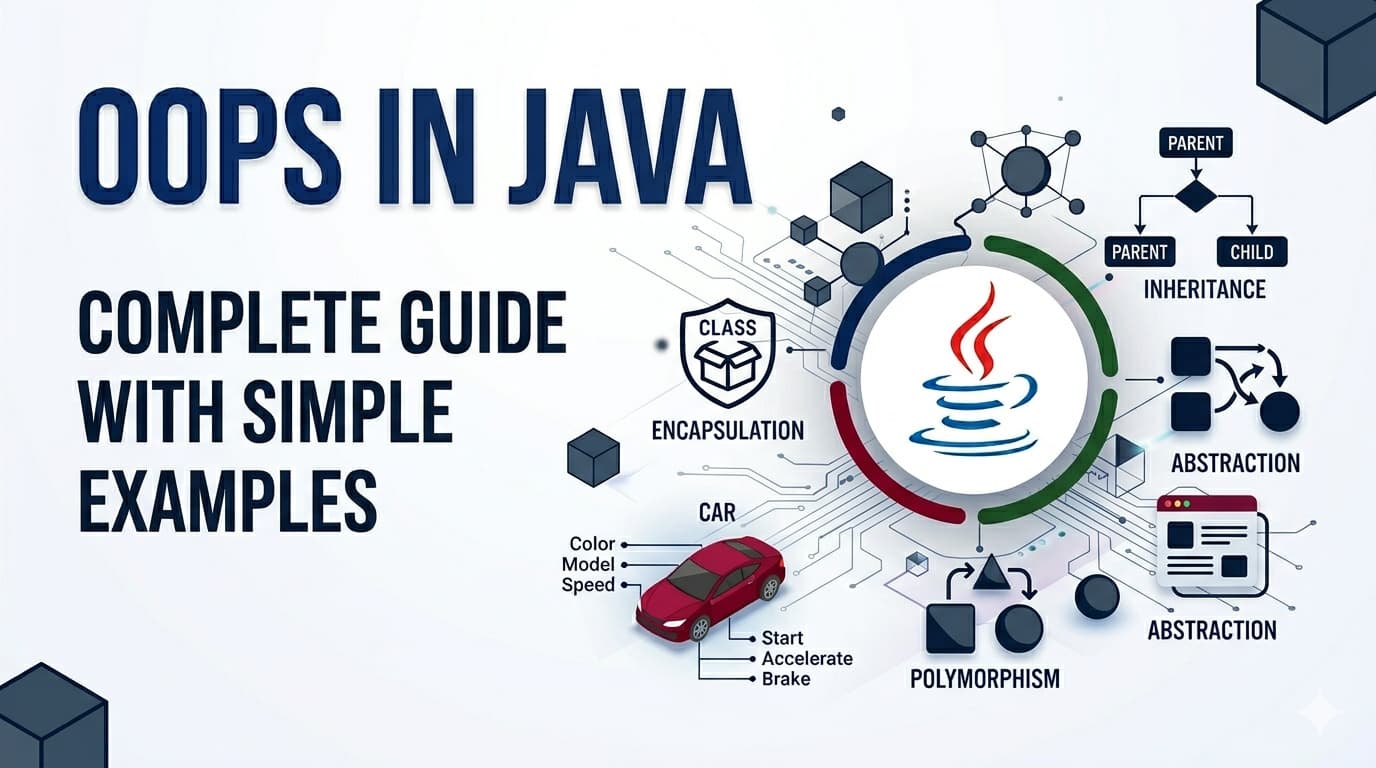
IntroductionObject Oriented Programming — or OOPs — is the foundation of Java. Almost every Java program you will ever write or read is built around OOPs concepts. The good news is these concepts are not complicated at all. They are actually modeled after how we think about real life things.By the end of this article you will understand every core OOPs concept clearly — not just enough to answer interview questions, but enough to actually use them confidently in your code.What Is Object Oriented Programming?Before OOPs, programmers wrote procedural code — a long sequence of instructions executed top to bottom. As programs grew bigger, this became a nightmare to manage. You could not organize related data and behavior together, reuse code cleanly, or model real world things naturally.OOPs solved this by organizing code around objects — just like the real world is organized around things. A car, a person, a bank account — each is a thing with properties and behaviors. OOPs lets you model these things directly in code.Java is a purely object oriented language (almost everything in Java is an object). That is why understanding OOPs is not optional in Java — it is essential.Class — The BlueprintA class is a blueprint or template. It defines what properties and behaviors an object of that type will have. The class itself is not an actual thing — it is just the design.Think of a class like an architectural blueprint of a house. The blueprint is not a house. But from one blueprint you can build many houses.class Car { // properties (what a car HAS) String brand; String color; int speed; // behaviors (what a car DOES) void accelerate() { System.out.println(brand + " is speeding up!"); } void brake() { System.out.println(brand + " is slowing down!"); }}Car is the blueprint. It defines that every car has a brand, color, speed, and can accelerate and brake. No actual car exists yet — this is just the design.Object — The Real ThingAn object is an actual instance created from a class. When you create an object, you are building a real house from the blueprint.public class Main { public static void main(String[] args) { // creating objects from the Car class Car car1 = new Car(); car1.brand = "Toyota"; car1.color = "Red"; car1.speed = 120; Car car2 = new Car(); car2.brand = "BMW"; car2.color = "Black"; car2.speed = 200; car1.accelerate(); // Toyota is speeding up! car2.brake(); // BMW is slowing down! }}car1 and car2 are two different objects from the same Car blueprint. Each has its own data but shares the same structure and behaviors.Constructor — The Object InitializerA constructor is a special method that runs automatically when an object is created. It is used to set initial values.class Car { String brand; String color; int speed; // constructor — same name as class, no return type Car(String brand, String color, int speed) { this.brand = brand; this.color = color; this.speed = speed; } void accelerate() { System.out.println(brand + " is speeding up!"); }}// Now creating objects is cleanerCar car1 = new Car("Toyota", "Red", 120);Car car2 = new Car("BMW", "Black", 200);The this keyword refers to the current object — it distinguishes between the parameter brand and the object's field brand.The Four Pillars of OOPsEverything in OOPs builds on four core concepts. These are what interviewers ask about and what real code is organized around.Pillar 1: Encapsulation — Wrapping and Protecting DataEncapsulation means bundling data (fields) and the methods that work on that data together in one class — and controlling access from outside.Think of a capsule pill. The medicine inside is protected by the outer shell. You do not mess with the medicine directly — you just swallow the capsule.In Java, encapsulation is achieved using access modifiers (private, public) and getters/setters.class BankAccount { private double balance; // private — no direct access from outside private String owner; BankAccount(String owner, double initialBalance) { this.owner = owner; this.balance = initialBalance; } // getter — read the balance public double getBalance() { return balance; } // setter with validation — controlled access public void deposit(double amount) { if (amount > 0) { balance += amount; System.out.println("Deposited: " + amount); } else { System.out.println("Invalid amount!"); } } public void withdraw(double amount) { if (amount > 0 && amount <= balance) { balance -= amount; } else { System.out.println("Insufficient funds!"); } }}BankAccount account = new BankAccount("Alice", 1000);// account.balance = -5000; // ERROR — private, cannot access directlyaccount.deposit(500); // controlled access through methodSystem.out.println(account.getBalance()); // 1500.0Why encapsulation matters: Without it, anyone could set balance = -999999 directly. With it, you control exactly how data can be changed — protecting your object's integrity.Pillar 2: Inheritance — Reusing Code Through Parent-Child RelationshipInheritance allows one class to acquire the properties and behaviors of another class. The child class gets everything the parent has and can add its own things on top.Think of it like genetics. A child inherits traits from their parents but also develops their own unique characteristics.In Java, inheritance uses the extends keyword.// Parent classclass Animal { String name; Animal(String name) { this.name = name; } void eat() { System.out.println(name + " is eating."); } void sleep() { System.out.println(name + " is sleeping."); }}// Child class inherits from Animalclass Dog extends Animal { String breed; Dog(String name, String breed) { super(name); // calls Animal's constructor this.breed = breed; } // Dog's own behavior void bark() { System.out.println(name + " says: Woof!"); }}class Cat extends Animal { Cat(String name) { super(name); } void meow() { System.out.println(name + " says: Meow!"); }}Dog dog = new Dog("Buddy", "Labrador");dog.eat(); // inherited from Animal — Buddy is eating.dog.sleep(); // inherited from Animal — Buddy is sleeping.dog.bark(); // Dog's own method — Buddy says: Woof!Cat cat = new Cat("Whiskers");cat.eat(); // inherited — Whiskers is eating.cat.meow(); // Cat's own — Whiskers says: Meow!super() calls the parent class constructor. super.methodName() calls a parent class method.Why inheritance matters: You write eat() and sleep() once in Animal and every animal class gets them for free. No repetition, clean organization.Pillar 3: Polymorphism — One Interface, Many FormsPolymorphism means the same method name behaves differently depending on the object calling it. It comes in two flavors.The word itself means "many forms" — same action, different results based on who is doing it.Think of a "speak" command given to different animals. You tell a dog to speak — it barks. You tell a cat to speak — it meows. Same command, different behavior.Method Overriding (Runtime Polymorphism)A child class provides its own version of a method already defined in the parent class.class Animal { String name; Animal(String name) { this.name = name; } void makeSound() { System.out.println(name + " makes a sound."); }}class Dog extends Animal { Dog(String name) { super(name); } @Override void makeSound() { System.out.println(name + " says: Woof!"); }}class Cat extends Animal { Cat(String name) { super(name); } @Override void makeSound() { System.out.println(name + " says: Meow!"); }}class Cow extends Animal { Cow(String name) { super(name); } @Override void makeSound() { System.out.println(name + " says: Moo!"); }}Animal[] animals = { new Dog("Buddy"), new Cat("Whiskers"), new Cow("Bella")};for (Animal a : animals) { a.makeSound(); // different behavior for each!}// Buddy says: Woof!// Whiskers says: Meow!// Bella says: Moo!Same makeSound() call on an Animal reference — but the actual behavior depends on what the object really is at runtime. That is runtime polymorphism.Method Overloading (Compile-Time Polymorphism)Same method name, different parameters in the same class.class Calculator { int add(int a, int b) { return a + b; } double add(double a, double b) { return a + b; } int add(int a, int b, int c) { return a + b + c; }}Calculator calc = new Calculator();calc.add(2, 3); // calls first method — 5calc.add(2.5, 3.5); // calls second method — 6.0calc.add(1, 2, 3); // calls third method — 6Java decides which version to call at compile time based on the argument types and count.Pillar 4: Abstraction — Hiding Complexity, Showing EssentialsAbstraction means showing only the necessary details to the user and hiding the internal complexity. You expose what something does, not how it does it.Think of driving a car. You know the steering wheel turns the car and the pedal accelerates it. You do not need to know how the engine combustion works internally. The complexity is hidden — only what you need to use is exposed.Java achieves abstraction through abstract classes and interfaces.Abstract ClassAn abstract class cannot be instantiated directly. It can have abstract methods (no body — child must implement) and regular methods (with body).abstract class Shape { String color; Shape(String color) { this.color = color; } // abstract method — no body, child MUST implement abstract double calculateArea(); // regular method — shared behavior void displayColor() { System.out.println("Color: " + color); }}class Circle extends Shape { double radius; Circle(String color, double radius) { super(color); this.radius = radius; } @Override double calculateArea() { return Math.PI * radius * radius; }}class Rectangle extends Shape { double width, height; Rectangle(String color, double width, double height) { super(color); this.width = width; this.height = height; } @Override double calculateArea() { return width * height; }}Shape circle = new Circle("Red", 5);Shape rect = new Rectangle("Blue", 4, 6);circle.displayColor(); // Color: RedSystem.out.println(circle.calculateArea()); // 78.53...System.out.println(rect.calculateArea()); // 24.0InterfaceAn interface is a 100% abstract contract — it only defines what methods a class must have, with no implementation (in older Java). A class can implement multiple interfaces.interface Flyable { void fly(); // every class implementing this MUST define fly()}interface Swimmable { void swim();}class Duck implements Flyable, Swimmable { @Override public void fly() { System.out.println("Duck is flying!"); } @Override public void swim() { System.out.println("Duck is swimming!"); }}Duck duck = new Duck();duck.fly(); // Duck is flying!duck.swim(); // Duck is swimming!Key difference between abstract class and interface:A class can extend only one abstract class but can implement multiple interfaces. Use abstract class when classes share common code. Use interface when you want to define a contract that unrelated classes can follow.Access Modifiers — Quick ReferenceAccess modifiers control who can access your class members:ModifierSame ClassSame PackageSubclassEverywhereprivate✅❌❌❌default✅✅❌❌protected✅✅✅❌public✅✅✅✅General rule — make fields private, make methods public unless there is a reason not to. This is encapsulation in practice.Quick Summary — All OOPs Concepts in One PlaceClass — Blueprint/template that defines structure and behaviorObject — Real instance created from a class using newConstructor — Special method that initializes an object when createdEncapsulation — Bundle data and methods together, control access with private/publicInheritance — Child class gets parent's properties and behaviors using extendsPolymorphism — Same method name behaves differently (overriding = runtime, overloading = compile time)Abstraction — Hide complexity, show only essentials using abstract class or interfaceFAQs — People Also AskQ1. What is the difference between a class and an object in Java? A class is the blueprint — it defines structure but does not exist in memory as a usable thing. An object is a real instance created from that blueprint using new. You can create many objects from one class, just like building many houses from one blueprint.Q2. What is the difference between abstract class and interface in Java? An abstract class can have both abstract (no body) and concrete (with body) methods, and a class can extend only one. An interface traditionally has only abstract methods and a class can implement multiple interfaces. Use abstract class for shared code, interface for defining contracts.Q3. What is the difference between method overriding and overloading? Overriding happens in a parent-child relationship — the child redefines a parent method with the same name and parameters. Overloading happens in the same class — same method name but different parameters. Overriding is resolved at runtime, overloading at compile time.Q4. Why is OOPs important in Java? Java is built entirely around OOPs. Every piece of Java code lives inside a class. OOPs enables code reuse through inheritance, data protection through encapsulation, flexibility through polymorphism, and simplicity through abstraction — all essential for building large, maintainable applications.ConclusionOOPs in Java is not a collection of confusing terms — it is a natural way of thinking about and organizing code. Classes are blueprints, objects are real things, encapsulation protects data, inheritance reuses code, polymorphism provides flexibility, and abstraction hides complexity.Once these four pillars feel natural, you will start seeing them everywhere — in every Java library, every framework, every codebase. That is when Java truly starts to click.

OOPsJavaClassesObjectsInheritancePolymorphismEncapsulationAbstraction
Mastering the Linux Infrastructure: A Comprehensive Guide to Raw Deployment

Mastering the Linux Infrastructure: A Comprehensive Guide to Raw Deployment

The transition from a local development environment to a production-ready server represents one of the most significant milestones in a developer's journey. While modern automated platforms offer seamless "one-click" deployments, they often abstract away the fundamental mechanics of the web. True technical autonomy is found in mastering the Linux process—the ability to configure, secure, and maintain the raw infrastructure that powers the modern internet.The Architecture of ProductionStandard development workflows typically involve local coding followed by a push to a version control system like GitHub. However, the professional landscape requires a deeper understanding of what happens beyond the repository.At the core of this transition is the Virtual Private Server (VPS). Unlike a local machine, a VPS is a persistent, globally accessible environment. To deploy "raw" means to manually bridge the gap between your code and the server's operating system. This approach provides total control over the environment, allowing for custom optimizations and deep troubleshooting that automated tools cannot provide.Remote Access and Environment NavigationInteracting with a production server requires proficiency in SSH (Secure Shell), which provides a secure, encrypted tunnel to your remote machine. Once connected, the terminal becomes your primary interface.Effective server management starts with high-visibility navigation. While basic commands are common knowledge, their professional application involves specific flags to reveal the true state of the system:Advanced Listing: Using ls -la is essential for identifying hidden configuration files such as .env or .ssh, while also displaying ownership and permission metadata.Path Validation: Frequent use of pwd (Print Working Directory) ensures that administrative actions are executed in the correct context, preventing accidental modification of system files.Structural Setup: Commands like mkdir for directory hierarchies and touch for file initialization are used to build the scaffolding required for the application runtime.The Security Hierarchy: Users and PermissionsSecurity is the cornerstone of professional deployment. Linux utilizes a robust permission model to protect data integrity.Privilege Escalation The "Root" user possesses absolute authority, which makes it a significant security risk if compromised. A professional deployment strategy involves creating a standard user and utilizing sudo (SuperUser Do) for administrative tasks. This creates an audit trail and prevents catastrophic accidental commands.File Permissions and Ownership Every file and directory on a Linux system is governed by a set of permissions: Read (r), Write (w), and Execute (x).Chmod: This command modifies who can interact with a file. For instance, sensitive configuration files should be restricted so that only the application owner can read them.Chown: This manages ownership, ensuring that web servers (like Nginx or Apache) have the specific rights they need to serve files without granting them excessive system access.Process Management and System LongevityIn a production setting, an application must exist as a persistent process that survives terminal disconnections and system reboots.Real-Time Monitoring To maintain system health, developers must monitor resource allocation. Tools like top or the more visual htop provide real-time data on CPU cycles, memory consumption, and active processes. This allows for the identification of memory leaks or runaway scripts before they impact user experience.Persistent Execution Unlike local development where a script might run in an active window, production applications are managed as background services. This involves configuring the system to treat the application as a "daemon"—a process that starts automatically on boot and recovers instantly if a crash occurs.Log Analysis: The Developer's Diagnostic ToolWhen a deployment fails, the terminal's output is often the only source of truth. Mastering the ability to read and "tail" log files is a non-negotiable skill. Using tail -f allows a developer to watch server logs in real-time, providing immediate feedback on incoming requests, database errors, or unauthorized access attempts.Conclusion: Why the Raw Approach PrevailsWhile abstraction layers and automated deployment tools have their place in rapid prototyping, they cannot replace the foundational knowledge of Linux. Understanding the raw deployment process grants a developer three distinct advantages: Cost Efficiency, Infrastructure Independence, and Diagnostic Power. By learning to manage the server manually, you move from being a user of tools to an architect of systems.The most effective way to internalize these concepts is through hands-on practice. Deploying a simple application on a raw Linux instance, configuring the firewall, and managing the application lifecycle manually is the definitive path to becoming a production-ready engineer.

LinuxWebDevelopmentDevOpsDeploymentServerManagementSystemAdministration
Ceil in a Sorted Array – Binary Search Explained with Story & Visuals | GeeksforGeeks

Ceil in a Sorted Array – Binary Search Explained with Story & Visuals | GeeksforGeeks

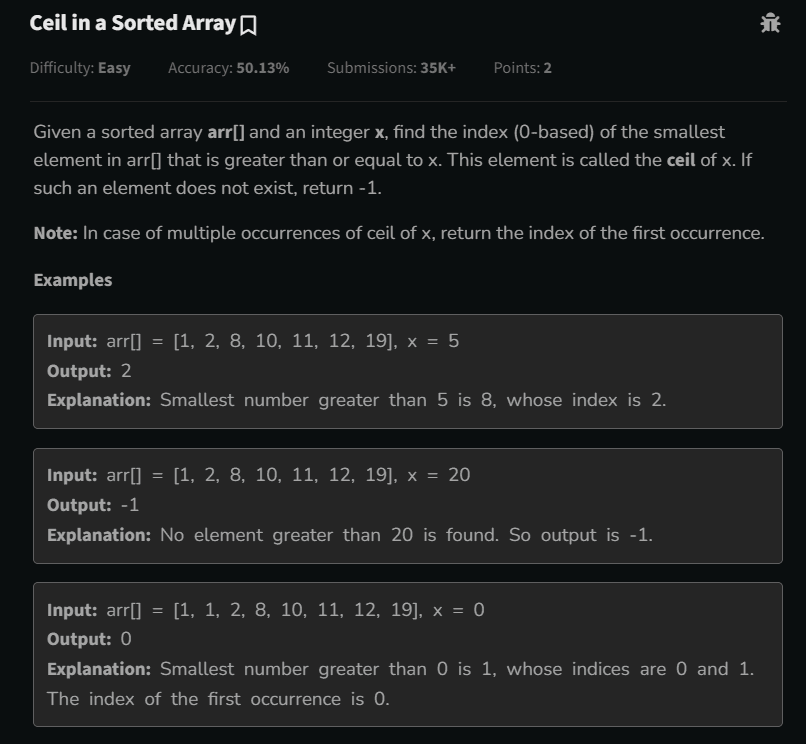
Try This Problem FirstPlatform: GeeksforGeeks👉 Try this problem here: Ceil in a Sorted Array – GeeksforGeeksProblem StatementYou are given a sorted array arr[] and an integer x. Your task is to find the index of the smallest element in the array that is greater than or equal to x.If no such element exists, return -1.If multiple elements equal the ceil, return the first occurrence.Example:Input: arr = [1, 2, 8, 10, 11, 12, 19], x = 5Output: 2Explanation: Smallest element ≥ 5 is 8 at index 2.IntuitionThink of the problem as finding the first step you can reach without falling short:The ceil of x is the smallest number ≥ x.Since the array is sorted, we can use binary search to quickly locate the answer instead of checking each element.Linear search is simple but slow for large arrays. Binary search gives an efficient O(log n) solution.Multiple Approaches1️⃣ Linear Search (Easy to Understand)int ans = -1;for(int i = 0; i < arr.length; i++){if(arr[i] >= x){ans = i; // first occurrencebreak;}}return ans;Time Complexity: O(n)Space Complexity: O(1)✅ Works for small arrays❌ Slow for large arrays2️⃣ Binary Search (Optimized & Fast)int ans = -1;int low = 0, high = arr.length - 1;while(low <= high){int mid = low + (high - low)/2;if(arr[mid] == x){ans = mid;high = mid - 1; // move left for first occurrence} else if(arr[mid] > x){ans = mid; // candidate ceilhigh = mid - 1; // move left} else {low = mid + 1; // arr[mid] < x → move right}}return ans;Time Complexity: O(log n)Space Complexity: O(1)✅ Efficient for large arrays✅ Automatically returns first occurrenceDry RunInput: arr = [1, 2, 8, 10, 11, 12, 19], x = 5Steplowhighmidarr[mid]ansAction1063103arr[mid] > x → move left202123arr[mid] < x → move right322282arr[mid] > x → move left421--2low > high → stop, return 2✅ Binary search finds ceil = 8 at index 2.Why This Problem is ImportantTeaches binary search for first occurrenceStrengthens understanding of ceil/floor conceptsVisualization through story improves understanding and retentionPrepares for coding interviews and competitive programmingConclusionLinear search: simple but slow (O(n))Binary search: fast and efficient (O(log n))Story-based visualization helps learn, not just memorizeUsing numbers on books in images makes abstract concepts concrete

GeeksForGeeksEasyBinary SearchSorted Array
I Published My First npm Package: Karos

I Published My First npm Package: Karos

IntroductionPublishing your first npm package is not about building something revolutionary.If you think it is, you’ll either overbuild it or never ship it.Karos exists because I kept running into the same boring, frustrating problem across backend projects — inconsistent API responses and messy error handling.The Problem I Kept SeeingIn most Express or Node.js backends:Every route formats responses differentlySome errors are strings, some are objects, some leak stack tracesStatus codes are inconsistent or guessedFrontend logic becomes defensive and conditional-heavyTeams rewrite the same response boilerplate in every projectThere is no enforced backend–frontend contract.Just “best practices” that slowly decay over time.Why I Didn’t Use Existing SolutionsThere are libraries that help with errors.There are frameworks that encourage conventions.But most of them:Add heavy abstractionsRequire configuration filesLock you into a framework styleMix business logic with infrastructureI didn’t want help.I wanted enforcement — and nothing more.What Karos Does (And Only This)Karos enforces one predictable JSON response contract across your API.That’s it.Success Response{"success": true,"data": {}}Error Response{"success": false,"error": {"code": "NOT_FOUND","message": "User not found"}}No special cases.No custom shapes per route.If a response doesn’t match this structure, it’s wrong.Stop Returning Errors. Start Throwing Them.Instead of this pattern everywhere:if (!user) {return res.status(404).json({ error: 'User not found' });}Karos forces a different mindset:if (!user) {notFoundError('User not found');}The error is thrown, not returned.A single global handler catches it, formats it, and sends the response.No repeated try/catchNo duplicated error formattingNo forgotten status codesKarosError: One Error Model to Rule Them AllAt the core of Karos is a single class: KarosError.Every error has:A strict error code (TypeScript-safe)An explicit HTTP statusOptional structured detailsA guaranteed JSON shapeThis makes backend behavior predictable and frontend handling trivial.Database Errors Are Normalized AutomaticallyRaw database errors should never reach the client.Karos automatically detects and normalizes common DB errors:Prisma unique constraint → CONFLICT (409)Prisma record not found → NOT_FOUND (404)MongoDB duplicate key → CONFLICT (409)Mongoose validation errors → VALIDATION_FAILED (400)The frontend never needs to know which database you’re using.It only cares about the contract.Express and Next.js Share the Same ContractKaros supports:Express via middlewareNext.js (App Router) via Web-standard helpersBoth produce the exact same response format.That means you can switch frameworks or mix them — and your frontend logic stays unchanged.Karos API – All Methods in One PlaceCore API ReferenceCategoryFunction / ClassDescriptionSuccessok(res, data, message?, meta?)Sends a standardized success response (Express)Error BaseKarosErrorBase error class with code, status, detailsError HelpersnotFoundError()Throws 404 NOT_FOUNDvalidationError()Throws 400 VALIDATION_FAILEDunauthorizedError()Throws 401 UNAUTHORIZEDforbiddenError()Throws 403 FORBIDDENconflictError()Throws 409 CONFLICTinternalError()Throws 500 INTERNAL_ERRORhttpError()Custom error with any statusMiddlewareerrorHandlerGlobal Express error handlerDB HandlingresolveDbError()Normalizes Prisma/Mongo errorsNext.jsnextOk()Success response for App RouternextFail()Error response for App RouterhandleNextError()Global Next.js error handlerTypesErrorCodeEnum-style error codesTypesApiSuccessResponseSuccess response typeTypesApiErrorResponseError response typeWhat Karos Is NotThis matters more than features.Karos is not:A validation libraryA logging frameworkA request lifecycle managerA replacement for good architectureA silver bulletIt solves one problem and refuses to grow beyond that.How You Can Publish Your First npm Package TooIf you’re thinking “this looks doable” — it is.Here are the actual steps, no fluff.1. Create an npm AccountGo to https://www.npmjs.comSign up and verify your email2. Prepare Your Packagenpm initMake sure:name is uniquemain points to your build outputtypes points to .d.ts if using TypeScript3. Build Your Packagenpm run build(Usually outputs to dist/)4. Login to npmnpm loginEnter:UsernamePasswordEmailOTP (if 2FA enabled)5. Publishnpm publishThat’s it.No approval process. No gatekeepers.You are officially an npm package author.LinksGitHub Repository: https://github.com/Krishna-Shrivastava-1/Karosnpm Package: https://www.npmjs.com/package/karosWhy Shipping This Mattered to MeKaros won’t make headlines.It won’t go viral.But it forced me to:Design a real API contractThink about DX instead of just codeHandle edge cases like DB errors properlyShip something other people can actually useFor a first npm package, that’s a win.Final ThoughtMost backend bugs don’t come from complex logic.They come from inconsistency.Karos doesn’t make your API smarter.It makes it disciplined.And sometimes, that’s exactly what you need.

npmexpressnextjserror-handlingtypescriptopen-sourcefirst-npm-package
Floor in a Sorted Array – Binary Search Explained with Story & Visuals | GeeksforGeeks

Floor in a Sorted Array – Binary Search Explained with Story & Visuals | GeeksforGeeks

Problem StatementPlatform: GeeksforGeeksYou are given a sorted array arr[] and an integer x. Your task is to find the index of the largest element in the array that is less than or equal to x.Return -1 if no such element exists.If multiple elements equal the floor, return the last occurrence.Example:Input: arr = [1, 2, 8, 10, 10, 12, 19], x = 11Output: 4✅ The largest element ≤ 11 is 10. The last occurrence is at index 4.👉 Try this problem here: GeeksforGeeks – Floor in a Sorted ArrayIntuition: What is “Floor” and Why It MattersImagine climbing stairs:You want to step as high as possible without going past a certain height.That step is your floor – the largest number ≤ x.In arrays:The floor of x is the largest number smaller than or equal to x.Because the array is sorted, we can search efficiently with binary search instead of checking every element.This is faster and helps you handle large arrays with millions of elements.Multiple Approaches1️⃣ Linear Search (Easy but Slow)Check each element from left to right. If it’s ≤ x, update the answer.int ans = -1;for(int i = 0; i < arr.length; i++){if(arr[i] <= x){ans = i; // store last occurrence}}return ans;Time Complexity: O(n) – slow for large arraysSpace Complexity: O(1) – constant memory2️⃣ Binary Search (Fast & Efficient)Binary search cuts the search space in half at every step.int ans = -1;int low = 0, high = arr.length - 1;while(low <= high){int mid = low + (high - low)/2;if(arr[mid] == x){ans = mid; // candidate floorlow = mid + 1; // move right for last occurrence} else if(arr[mid] < x){ans = mid; // candidate floorlow = mid + 1;} else {high = mid - 1; // too large, move left}}return ans;Time Complexity: O(log n) – very fastSpace Complexity: O(1) – no extra spaceDry Run / Step-by-StepInput: arr = [1, 2, 8, 10, 10, 12, 19], x = 11Steplowhighmidarr[mid]ansAction1063103arr[mid] < x → move right2465123arr[mid] > x → move left3444104arr[mid] < x → move right454--4low > high → stop, return 4✅ Finds floor = 10 at index 4.Code Explanation in Simple Wordsans = -1 → stores best candidate for floor.Use low and high as binary search boundaries.mid = low + (high - low)/2 → safe midpoint.If arr[mid] <= x, it can be the floor → move right to find last occurrence.If arr[mid] > x, move left → floor is smaller.Loop ends when low > high, return ans.Edge Cases to Rememberx < arr[0] → return -1 (floor doesn’t exist)x ≥ arr[n-1] → return last index (floor is last element)Duplicates → always return last occurrenceStory-Based Visual Example: “Alice’s Book Shelf Adventure” 📚Scenario:Alice is a librarian.Books are arranged by height on a shelf.She has a new book and wants to place it next to the tallest book shorter than or equal to hers.Instead of checking each book, she uses a binary search approach to find the position quickly."Alice is scanning the bookshelf, which represents a sorted array: [1, 2, 8, 10, 10, 12, 19]. She is thinking where to place her new book labeled 11. This step represents the initial step of the floor algorithm, understanding the array elements.""Alice places the book labeled 11 right after the last 10 on the shelf. This demonstrates finding the floor: the largest number ≤ 11 is 10, and the book is positioned next to it, illustrating the last occurrence logic.""From a top view, Alice is scanning all the books. This shows how binary search would conceptually divide the array: she quickly decides which section the book 11 belongs to without checking every book, demonstrating efficient search.""Alice has successfully placed the book 11 at the correct position. The floor of 11 is 10 (index 4). This visual confirms the algorithm’s result: the new element is positioned immediately after the last element ≤ x, exactly as binary search would determine."Why This Problem is ImportantStrengthens binary search skillsTeaches last occurrence / boundary conditions handlingMakes you think algorithmically, not just about numbersStory-based learning improves retention and understandingConclusionLinear search: easy but slow (O(n))Binary search: fast, elegant (O(log n))Multiple dry run steps make it easy to followStory-based images make abstract concepts concrete and memorable

GeeksforGeeksBinary SearchEasy
Ai Assistant Kas