Stack Data Structure in Java: The Complete In-Depth Guide

Stack Data Structure in Java: The Complete In-Depth Guide

Everything You Need to Know — What It Is, How It Works, Multiple Implementations, Operations, Advantages, Disadvantages, and Practice Problems

9 views
0
0
Listen to articleAudio version

1. What Is a Stack?

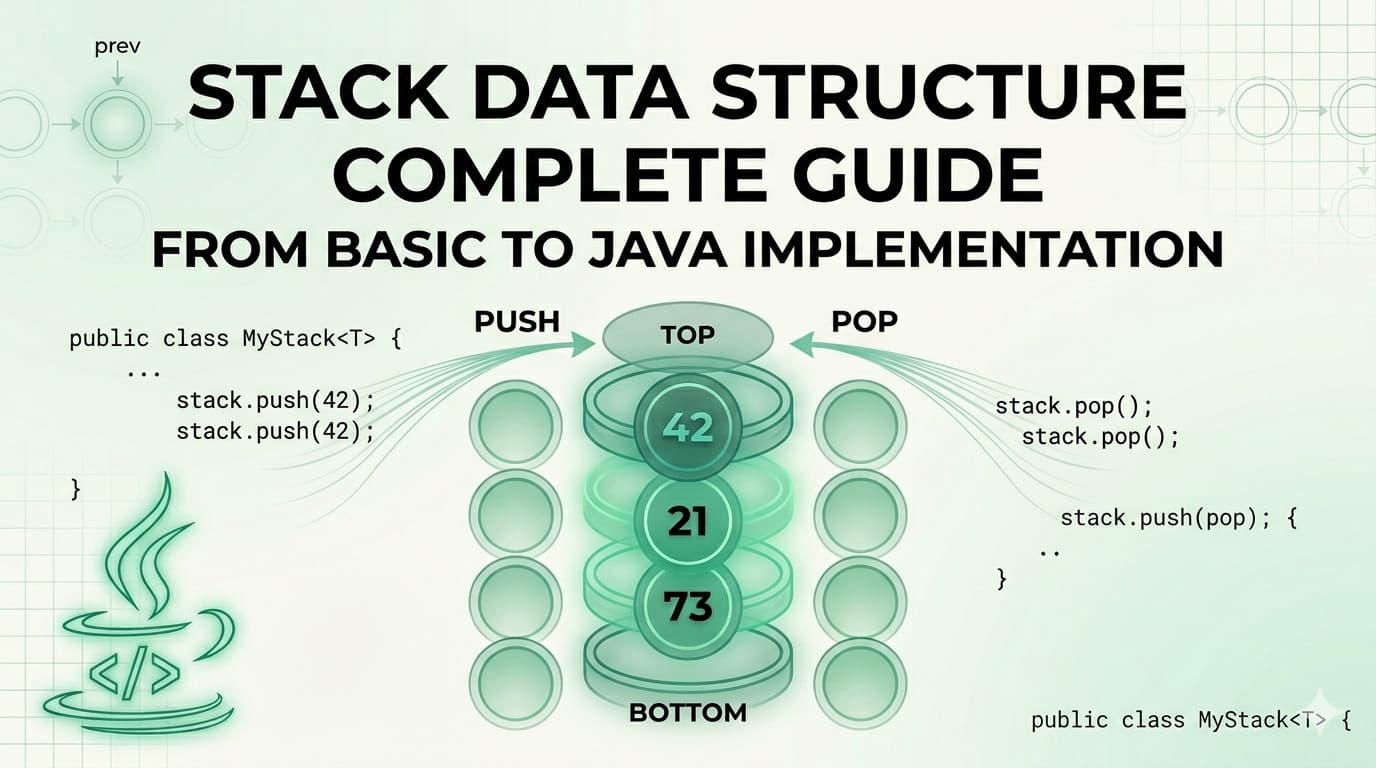
A Stack is a linear data structure that stores elements in a sequential order, but with one strict rule — you can only insert or remove elements from one end, called the top.

It is one of the simplest yet most powerful data structures in computer science. Its strength comes from its constraint. Because everything happens at one end, the behavior of a stack is completely predictable.

The formal definition: A Stack is a linear data structure that follows the Last In, First Out (LIFO) principle — the element inserted last is the first one to be removed.

Here is what a stack looks like visually:

┌──────────┐
│ 50 │ ← TOP (last inserted, first removed)
├──────────┤
│ 40 │
├──────────┤
│ 30 │
├──────────┤
│ 20 │
├──────────┤
│ 10 │ ← BOTTOM (first inserted, last removed)
└──────────┘

When you push 60 onto this stack, it goes on top. When you pop, 60 comes out first. That is LIFO.

2. Real-World Analogies

Before writing a single line of code, it helps to see stacks in the real world. These analogies will make the concept permanently stick.

A Pile of Plates In a cafeteria, clean plates are stacked on top of each other. You always pick the top plate. You always place a new plate on top. You never reach into the middle. This is a stack.

Browser Back Button Every time you visit a new webpage, it gets pushed onto a history stack. When you press the Back button, the browser pops the most recent page off the stack and takes you there. The page you visited first is at the bottom — you only reach it after going back through everything else.

Undo Feature in Text Editors When you type in a document and press Ctrl+Z, the most recent action is undone first. That is because every action you perform is pushed onto a stack. Undo simply pops from that stack.

Call Stack in Programming When a function calls another function, the current function's state is pushed onto the call stack. When the inner function finishes, it is popped off and execution returns to the outer function. This is the literal stack your programs run on.

A Stack of Books Put five books on a table, one on top of another. You can only take the top book without knocking the pile over. That is a stack.

3. The LIFO Principle Explained

LIFO stands for Last In, First Out.

It means whatever you put in last is the first thing to come out. This is the exact opposite of a Queue (which is FIFO — First In, First Out).

Let us trace through an example step by step:

Start: Stack is empty → []

Push 10 → [10] (10 is at the top)
Push 20 → [10, 20] (20 is at the top)
Push 30 → [10, 20, 30] (30 is at the top)

Pop → returns 30 (30 was last in, first out)
Stack: [10, 20]

Pop → returns 20
Stack: [10]

Peek → returns 10 (just looks, does not remove)
Stack: [10]

Pop → returns 10
Stack: [] (stack is now empty)

Every single operation happens only at the top. The bottom of the stack is never directly accessible.

4. Stack Operations & Time Complexity

A stack supports the following core operations:

OperationDescriptionTime Complexity
push(x)Insert element x onto the top of the stackO(1)
pop()Remove and return the top elementO(1)
peek() / top()Return the top element without removing itO(1)
isEmpty()Check if the stack has no elementsO(1)
isFull()Check if the stack has reached its capacity (Array only)O(1)
size()Return the number of elements in the stackO(1)
search(x)Find position of element from top (Java built-in only)O(n)

All primary stack operations — push, pop, peek, isEmpty — run in O(1) constant time. This is what makes the stack so efficient. It does not matter whether the stack has 10 elements or 10 million — these operations are always instant.

Space complexity for a stack holding n elements is O(n).

5. Implementation 1 — Using a Static Array

This is the most fundamental way to implement a stack. We use a fixed-size array and a variable called top to track where the top of the stack currently is.

How it works:

  1. top starts at -1 (stack is empty)
  2. On push: increment top, then place the element at arr[top]
  3. On pop: return arr[top], then decrement top
  4. On peek: return arr[top] without changing it
// StackUsingArray.java

public class StackUsingArray {

private int[] arr;
private int top;
private int capacity;

// Constructor — initialize with a fixed capacity
public StackUsingArray(int capacity) {
this.capacity = capacity;
arr = new int[capacity];
top = -1;
}

// Push: add element to the top
public void push(int value) {
if (isFull()) {
System.out.println("Stack Overflow! Cannot push " + value);
return;
}
arr[++top] = value;
System.out.println("Pushed: " + value);
}

// Pop: remove and return top element
public int pop() {
if (isEmpty()) {
System.out.println("Stack Underflow! Stack is empty.");
return -1;
}
return arr[top--];
}

// Peek: view the top element without removing
public int peek() {
if (isEmpty()) {
System.out.println("Stack is empty.");
return -1;
}
return arr[top];
}

// Check if stack is empty
public boolean isEmpty() {
return top == -1;
}

// Check if stack is full
public boolean isFull() {
return top == capacity - 1;
}

// Return current size
public int size() {
return top + 1;
}

// Display all elements
public void display() {
if (isEmpty()) {
System.out.println("Stack is empty.");
return;
}
System.out.print("Stack (top → bottom): ");
for (int i = top; i >= 0; i--) {
System.out.print(arr[i] + " ");
}
System.out.println();
}

// Main method to test
public static void main(String[] args) {
StackUsingArray stack = new StackUsingArray(5);

stack.push(10);
stack.push(20);
stack.push(30);
stack.push(40);
stack.push(50);
stack.push(60); // This will trigger Stack Overflow

stack.display();

System.out.println("Peek: " + stack.peek());
System.out.println("Pop: " + stack.pop());

stack.display();
System.out.println("Size: " + stack.size());
}
}
```

**Output:**
```
Pushed: 10
Pushed: 20
Pushed: 30
Pushed: 40
Pushed: 50
Stack Overflow! Cannot push 60
Stack (top → bottom): 50 40 30 20 10
Peek: 50
Pop: 50
Pop: 40
Stack (top → bottom): 30 20 10
Size: 3

Key Points about Array Implementation:

  1. Fixed size — you must declare capacity upfront
  2. Very fast — direct array index access
  3. Stack Overflow is possible if capacity is exceeded
  4. Memory is pre-allocated even if stack is not full

6. Implementation 2 — Using an ArrayList

An ArrayList-based stack removes the fixed-size limitation. The ArrayList grows dynamically, so you never have to worry about stack overflow due to capacity.

How it works:

  1. The end of the ArrayList acts as the top
  2. add() is used for push
  3. remove(size - 1) is used for pop
  4. get(size - 1) is used for peek
// StackUsingArrayList.java

import java.util.ArrayList;

public class StackUsingArrayList {

private ArrayList<Integer> list;

// Constructor
public StackUsingArrayList() {
list = new ArrayList<>();
}

// Push: add to the end (which is our top)
public void push(int value) {
list.add(value);
System.out.println("Pushed: " + value);
}

// Pop: remove and return the last element
public int pop() {
if (isEmpty()) {
System.out.println("Stack Underflow! Stack is empty.");
return -1;
}
int top = list.get(list.size() - 1);
list.remove(list.size() - 1);
return top;
}

// Peek: view the last element
public int peek() {
if (isEmpty()) {
System.out.println("Stack is empty.");
return -1;
}
return list.get(list.size() - 1);
}

// Check if stack is empty
public boolean isEmpty() {
return list.isEmpty();
}

// Return size
public int size() {
return list.size();
}

// Display elements from top to bottom
public void display() {
if (isEmpty()) {
System.out.println("Stack is empty.");
return;
}
System.out.print("Stack (top → bottom): ");
for (int i = list.size() - 1; i >= 0; i--) {
System.out.print(list.get(i) + " ");
}
System.out.println();
}

// Main method to test
public static void main(String[] args) {
StackUsingArrayList stack = new StackUsingArrayList();

stack.push(5);
stack.push(15);
stack.push(25);
stack.push(35);

stack.display();

System.out.println("Peek: " + stack.peek());
System.out.println("Pop: " + stack.pop());

stack.display();
System.out.println("Is Empty: " + stack.isEmpty());
System.out.println("Size: " + stack.size());
}
}
```

**Output:**
```
Pushed: 5
Pushed: 15
Pushed: 25
Pushed: 35
Stack (top → bottom): 35 25 15 5
Peek: 35
Pop: 35
Pop: 25
Stack (top → bottom): 15 5
Is Empty: false
Size: 2

Key Points about ArrayList Implementation:

  1. Dynamic size — grows automatically as needed
  2. No overflow risk
  3. Slight overhead compared to raw array due to ArrayList internals
  4. Excellent for most practical use cases

7. Implementation 3 — Using a LinkedList

A LinkedList-based stack is the most memory-efficient approach when you do not know the stack size in advance. Each element (node) holds data and a pointer to the next node. The head of the LinkedList acts as the top of the stack.

How it works:

  1. Each node stores a value and a reference to the node below it
  2. Push creates a new node and makes it the new head
  3. Pop removes the head node and returns its value
  4. Peek returns the head node's value without removing it
// StackUsingLinkedList.java

public class StackUsingLinkedList {

// Inner Node class
private static class Node {
int data;
Node next;

Node(int data) {
this.data = data;
this.next = null;
}
}

private Node top; // Head of the linked list = top of stack
private int size;

// Constructor
public StackUsingLinkedList() {
top = null;
size = 0;
}

// Push: create new node and link it to top
public void push(int value) {
Node newNode = new Node(value);
newNode.next = top; // new node points to current top
top = newNode; // new node becomes the new top
size++;
System.out.println("Pushed: " + value);
}

// Pop: remove and return top node's data
public int pop() {
if (isEmpty()) {
System.out.println("Stack Underflow! Stack is empty.");
return -1;
}
int value = top.data;
top = top.next; // move top pointer to next node
size--;
return value;
}

// Peek: return top node's data without removing
public int peek() {
if (isEmpty()) {
System.out.println("Stack is empty.");
return -1;
}
return top.data;
}

// Check if empty
public boolean isEmpty() {
return top == null;
}

// Return size
public int size() {
return size;
}

// Display elements from top to bottom
public void display() {
if (isEmpty()) {
System.out.println("Stack is empty.");
return;
}
System.out.print("Stack (top → bottom): ");
Node current = top;
while (current != null) {
System.out.print(current.data + " ");
current = current.next;
}
System.out.println();
}

// Main method to test
public static void main(String[] args) {
StackUsingLinkedList stack = new StackUsingLinkedList();

stack.push(100);
stack.push(200);
stack.push(300);
stack.push(400);

stack.display();

System.out.println("Peek: " + stack.peek());
System.out.println("Pop: " + stack.pop());

stack.display();
System.out.println("Size: " + stack.size());
}
}
```

**Output:**
```
Pushed: 100
Pushed: 200
Pushed: 300
Pushed: 400
Stack (top → bottom): 400 300 200 100
Peek: 400
Pop: 400
Pop: 300
Stack (top → bottom): 200 100
Size: 2

Key Points about LinkedList Implementation:

  1. Truly dynamic — each node allocated only when needed
  2. No wasted memory from pre-allocation
  3. Slightly more memory per element (each node carries a pointer)
  4. Ideal for stacks where size is completely unknown

8. Java's Built-in Stack Class

Java provides a ready-made Stack class inside java.util. It extends Vector and is thread-safe by default.

// JavaBuiltinStack.java

import java.util.Stack;

public class JavaBuiltinStack {

public static void main(String[] args) {

Stack<Integer> stack = new Stack<>();

// Push elements
stack.push(10);
stack.push(20);
stack.push(30);
stack.push(40);

System.out.println("Stack: " + stack);

// Peek — look at top without removing
System.out.println("Peek: " + stack.peek());

// Pop — remove top
System.out.println("Pop: " + stack.pop());
System.out.println("After pop: " + stack);

// Search — returns 1-based position from top
System.out.println("Search 20: position " + stack.search(20));

// isEmpty
System.out.println("Is Empty: " + stack.isEmpty());

// Size
System.out.println("Size: " + stack.size());
}
}
```

**Output:**
```
Stack: [10, 20, 30, 40]
Peek: 40
Pop: 40
After pop: [10, 20, 30]
Search 20: position 2
Is Empty: false
Size: 3

Important Note: In modern Java development, it is often recommended to use Deque (specifically ArrayDeque) instead of Stack for better performance, since Stack is synchronized and carries the overhead of Vector.

// Using ArrayDeque as a stack (modern preferred approach)

import java.util.ArrayDeque;
import java.util.Deque;

public class ModernStack {
public static void main(String[] args) {
Deque<Integer> stack = new ArrayDeque<>();

stack.push(10); // pushes to front
stack.push(20);
stack.push(30);

System.out.println("Top: " + stack.peek());
System.out.println("Pop: " + stack.pop());
System.out.println("Stack: " + stack);
}
}

9. Comparison of All Implementations

FeatureArrayArrayListLinkedListJava StackArrayDeque
SizeFixedDynamicDynamicDynamicDynamic
Stack Overflow RiskYesNoNoNoNo
Memory UsagePre-allocatedAuto-growsPer-node overheadAuto-growsAuto-grows
Push TimeO(1)O(1) amortizedO(1)O(1)O(1)
Pop TimeO(1)O(1)O(1)O(1)O(1)
Peek TimeO(1)O(1)O(1)O(1)O(1)
Thread SafeNoNoNoYesNo
Best ForKnown size, max speedGeneral useUnknown/huge sizeLegacy codeModern Java

10. Advantages & Disadvantages

Advantages

AdvantageExplanation
Simple to implementVery few rules and operations to worry about
O(1) operationsPush, pop, and peek are all constant time
Memory efficientNo extra pointers needed (array-based)
Supports recursionThe call stack is itself a stack
Easy undo/redoNatural fit for reversible action tracking
BacktrackingPerfectly suited for maze, puzzle, and game solving
Expression evaluationPowers compilers and calculators

Disadvantages

DisadvantageExplanation
Limited accessCannot access elements in the middle directly
Fixed size (array)Array-based stacks overflow if size is exceeded
No random accessYou cannot do stack[2] — only top is accessible
Memory waste (array)Pre-allocated array wastes space if underused
Not suitable for all problemsMany problems need queues, trees, or graphs instead
Stack overflow in recursionVery deep recursion can overflow the JVM call stack

11. Real-World Use Cases of Stack

Understanding when to use a stack is just as important as knowing how to implement one. Here is where stacks show up in real software:

Function Call Management (Call Stack) Every time your Java program calls a method, the JVM pushes that method's frame onto the call stack. When the method returns, the frame is popped. This is why you see "StackOverflowError" when you write infinite recursion.

Undo and Redo Operations Text editors, image editors (Photoshop), and IDEs use two stacks — one for undo history and one for redo history. Every action pushes onto the undo stack. Ctrl+Z pops from it and pushes to the redo stack.

Browser Navigation Your browser maintains a back-stack and a forward-stack. Visiting a new page pushes to the back-stack. Pressing Back pops from it and pushes to the forward-stack.

Expression Evaluation and Conversion Compilers use stacks to evaluate arithmetic expressions and convert between infix, prefix, and postfix notations. For example: 3 + 4 * 2 must be evaluated considering operator precedence — this is done with a stack.

Balanced Parentheses Checking Linters, compilers, and IDEs use stacks to check if brackets are balanced: {[()]} is valid, {[(])} is not.

Backtracking Algorithms Maze solving, N-Queens, Sudoku solvers, and depth-first search all use stacks (explicitly or via recursion) to backtrack to previous states when a path fails.

Syntax Parsing Compilers parse source code using stacks to match opening and closing constructs like if/else, try/catch, { and }.

12. Practice Problems with Full Solutions

Here is where things get really interesting. These problems will sharpen your stack intuition and prepare you for coding interviews.

Problem 1 — Reverse a String Using a Stack

Difficulty: Easy

Problem: Write a Java program to reverse a string using a Stack.

Approach: Push every character of the string onto a stack, then pop them all. Since LIFO reverses the order, the characters come out reversed.

// ReverseString.java

import java.util.Stack;

public class ReverseString {

public static String reverse(String str) {
Stack<Character> stack = new Stack<>();

// Push all characters
for (char c : str.toCharArray()) {
stack.push(c);
}

// Pop all characters to build reversed string
StringBuilder reversed = new StringBuilder();
while (!stack.isEmpty()) {
reversed.append(stack.pop());
}

return reversed.toString();
}

public static void main(String[] args) {
System.out.println(reverse("hello")); // olleh
System.out.println(reverse("java")); // avaj
System.out.println(reverse("racecar")); // racecar (palindrome)
System.out.println(reverse("datastructure")); // erutcurtasatad
}
}

Problem 2 — Check Balanced Parentheses

Difficulty: Easy–Medium

Problem: Given a string containing (, ), {, }, [, ], determine if the brackets are balanced.

Approach: Push every opening bracket onto the stack. When you see a closing bracket, check if it matches the top of the stack. If it does, pop. If it does not, the string is unbalanced.

// BalancedParentheses.java

import java.util.Stack;

public class BalancedParentheses {

public static boolean isBalanced(String expr) {
Stack<Character> stack = new Stack<>();

for (char c : expr.toCharArray()) {

// Push all opening brackets
if (c == '(' || c == '{' || c == '[') {
stack.push(c);
}

// For closing brackets, check the top of stack
else if (c == ')' || c == '}' || c == ']') {

if (stack.isEmpty()) return false;

char top = stack.pop();

if (c == ')' && top != '(') return false;
if (c == '}' && top != '{') return false;
if (c == ']' && top != '[') return false;
}
}

// Stack must be empty at the end for a balanced expression
return stack.isEmpty();
}

public static void main(String[] args) {
System.out.println(isBalanced("{[()]}")); // true
System.out.println(isBalanced("{[(])}")); // false
System.out.println(isBalanced("((()))")); // true
System.out.println(isBalanced("{]")); // false
System.out.println(isBalanced("")); // true (empty is balanced)
}
}

Problem 3 — Reverse a Stack (Without Extra Data Structure)

Difficulty: Medium–Hard

Problem: Reverse all elements of a stack using only recursion — no array or extra stack allowed.

Approach: This is a classic recursion problem. You need two recursive functions:

  1. insertAtBottom(stack, item) — inserts an element at the very bottom of the stack
  2. reverseStack(stack) — pops all elements, reverses, and uses insertAtBottom to rebuild
// ReverseStack.java

import java.util.Stack;

public class ReverseStack {

// Insert an element at the bottom of the stack
public static void insertAtBottom(Stack<Integer> stack, int item) {
if (stack.isEmpty()) {
stack.push(item);
return;
}
int top = stack.pop();
insertAtBottom(stack, item);
stack.push(top);
}

// Reverse the stack using insertAtBottom
public static void reverseStack(Stack<Integer> stack) {
if (stack.isEmpty()) return;

int top = stack.pop();
reverseStack(stack); // reverse the remaining stack
insertAtBottom(stack, top); // insert popped element at bottom
}

public static void main(String[] args) {
Stack<Integer> stack = new Stack<>();
stack.push(1);
stack.push(2);
stack.push(3);
stack.push(4);
stack.push(5);

System.out.println("Before: " + stack); // [1, 2, 3, 4, 5]
reverseStack(stack);
System.out.println("After: " + stack); // [5, 4, 3, 2, 1]
}
}

Problem 4 — Evaluate a Postfix Expression

Difficulty: Medium

Problem: Evaluate a postfix (Reverse Polish Notation) expression. Example: "2 3 4 * +" should return 14 because it is 2 + (3 * 4).

Approach: Scan left to right. If you see a number, push it. If you see an operator, pop two numbers, apply the operator, and push the result.

// PostfixEvaluation.java

import java.util.Stack;

public class PostfixEvaluation {

public static int evaluate(String expression) {
Stack<Integer> stack = new Stack<>();
String[] tokens = expression.split(" ");

for (String token : tokens) {
// If it's a number, push it
if (token.matches("-?\\d+")) {
stack.push(Integer.parseInt(token));
}
// If it's an operator, pop two and apply
else {
int b = stack.pop(); // second operand
int a = stack.pop(); // first operand

switch (token) {
case "+": stack.push(a + b); break;
case "-": stack.push(a - b); break;
case "*": stack.push(a * b); break;
case "/": stack.push(a / b); break;
}
}
}

return stack.pop();
}

public static void main(String[] args) {
System.out.println(evaluate("2 3 4 * +")); // 14 → 2 + (3*4)
System.out.println(evaluate("5 1 2 + 4 * + 3 -")); // 14 → 5+((1+2)*4)-3
System.out.println(evaluate("3 4 +")); // 7
}
}

Problem 5 — Next Greater Element

Difficulty: Medium

Problem: For each element in an array, find the next greater element to its right. If none exists, output -1.

Example: Input: [4, 5, 2, 10, 8] → Output: [5, 10, 10, -1, -1]

Approach: Iterate right to left. Maintain a stack of candidates. For each element, pop all stack elements that are smaller than or equal to it — they can never be the answer for any element to the left. The top of the stack (if not empty) is the next greater element.

// NextGreaterElement.java

import java.util.Stack;
import java.util.Arrays;

public class NextGreaterElement {

public static int[] nextGreater(int[] arr) {
int n = arr.length;
int[] result = new int[n];
Stack<Integer> stack = new Stack<>(); // stores elements, not indices

// Traverse from right to left
for (int i = n - 1; i >= 0; i--) {

// Pop elements smaller than or equal to current
while (!stack.isEmpty() && stack.peek() <= arr[i]) {
stack.pop();
}

// Next greater element
result[i] = stack.isEmpty() ? -1 : stack.peek();

// Push current element for future comparisons
stack.push(arr[i]);
}

return result;
}

public static void main(String[] args) {
int[] arr1 = {4, 5, 2, 10, 8};
System.out.println(Arrays.toString(nextGreater(arr1))); // [5, 10, 10, -1, -1]

int[] arr2 = {1, 3, 2, 4};
System.out.println(Arrays.toString(nextGreater(arr2))); // [3, 4, 4, -1]

int[] arr3 = {5, 4, 3, 2, 1};
System.out.println(Arrays.toString(nextGreater(arr3))); // [-1, -1, -1, -1, -1]
}
}

Problem 6 — Sort a Stack Using Recursion

Difficulty: Hard

Problem: Sort a stack in ascending order (smallest on top) using only recursion — no loops, no extra data structure.

// SortStack.java

import java.util.Stack;

public class SortStack {

// Insert element in correct sorted position
public static void sortedInsert(Stack<Integer> stack, int item) {
if (stack.isEmpty() || item > stack.peek()) {
stack.push(item);
return;
}
int top = stack.pop();
sortedInsert(stack, item);
stack.push(top);
}

// Sort the stack
public static void sortStack(Stack<Integer> stack) {
if (stack.isEmpty()) return;

int top = stack.pop();
sortStack(stack); // sort remaining
sortedInsert(stack, top); // insert top in sorted position
}

public static void main(String[] args) {
Stack<Integer> stack = new Stack<>();
stack.push(34);
stack.push(3);
stack.push(31);
stack.push(98);
stack.push(92);
stack.push(23);

System.out.println("Before sort: " + stack);
sortStack(stack);
System.out.println("After sort: " + stack); // smallest on top
}
}

13. Summary & Key Takeaways

A stack is a simple, elegant, and powerful data structure. Here is everything in one place:

What it is: A linear data structure that follows LIFO — Last In, First Out.

Core operations: push (add to top), pop (remove from top), peek (view top), isEmpty — all in O(1) time.

Three ways to implement it in Java:

  1. Array-based: fast, fixed size, risk of overflow
  2. ArrayList-based: dynamic, easy, slightly more overhead
  3. LinkedList-based: truly dynamic, memory-efficient per-element, best for unknown sizes

When to use it:

  1. Undo/redo systems
  2. Browser navigation
  3. Balancing brackets and parentheses
  4. Evaluating mathematical expressions
  5. Backtracking problems
  6. Managing recursive function calls
  7. Depth-first search

When NOT to use it:

  1. When you need random access to elements
  2. When insertion/deletion is needed from both ends (use Deque)
  3. When you need to search efficiently (use HashMap or BST)

Modern Java recommendation: Prefer ArrayDeque over the legacy Stack class for non-thread-safe scenarios. Use Stack only when you need synchronized access.

The stack is one of those data structures that once you truly understand, you start seeing it everywhere — in your browser, in your IDE, in recursive algorithms, and deep within the operating system itself.

This article covered everything from the fundamentals of the Stack data structure to multiple Java implementations, time complexity analysis, real-world applications, and six practice problems of increasing difficulty. Bookmark it as a reference and revisit the practice problems regularly — they are the real test of your understanding.
Ai Assistant Kas